Catalog Functions
AUTHORIZATION
Get Access Token
GET /v1/oauth/accessToken
1. Function Introduction:
With this API, a merchant server can obtain an Access Token from Open Platform. The merchant server is then authorized by Open Platform to provide services like get User Profile, send Notification.
- Before calling this API, call the GetUserAuth Mini API to obtain an Authorization Token from the MoMo App Platform. Then call this API to exchange for an Access Token from Open Platform.
- When the original Access Token expires, use this API with the old Authorization Token to exchange for a new Access Token.
- An Access Token should be kept in the merchant server only, which means it should not be sent to the Mini App.
2. Function Request & Response params
REQUEST
URL Test:
https://api.mservice.com.vn/openapi/gateway/open/v1/oauth/accessToken?partnerUserId={{partnerUserId}}
URL Prod:
https://openapi.momo.vn/gateway/open/v1/oauth/accessToken?partnerUserId={{partnerUserId}}
Method : GET
Response Type : text/json
Headers
| Header | Data type | Required | Description |
|---|---|---|---|
| Authorization | String | Yes | Bearer authCode |
| OP-Signature | String | Yes | Refer to Open Signature to know how to create OP-Signature |
| M-Timestamp | String | Yes | Timestamp when client makes request |
| mediaTypeId | String | No | Set the value for this Header with miniAppID - the ID of the Mini App that calls OpenAPIs. For more details, see the Encrypt and Decrypt Data guide. |
| encrypted | Boolean | No | **true: **if Request Data is encrypted. false: if Request Data is unencrypted. For more details, see the Encrypt and Decrypt Data guide. |
| requestKey | String | No | Encrypted Symmetric Key that used to encrypt Request Data. For more details, see the Encrypt and Decrypt Data guide. |
**Query Parameters **
| Param | Data type | Required | Description |
|---|---|---|---|
| partnerUserId | String | Yes | Data from GetUserAuth Mini API |
RESPONSE
The incoming parameter of callback is of the Object type with the following attributes:
| Param | Data type | Description |
|---|---|---|
| requestId | String | Id of Request |
| accessToken | String | Use to call API when get User Profile |
| expiredTime | Long | Time-to-live of accessToken |
**3. Sample Request & Response **
Response
{
   “requestId”: "ecf01b95-48e4-4573-8305-138b33b089da"
   “accessToken”: "eyJ..."
   “expiredTime”: 1649231851494
}
USER
Get User Consents
GET /v1/msd/users
1. Function Introduction
With this API, Third-Party Backend can access user’s information (that is granted by User). The Access Token will be used during API calls.
Before calling this API, follow the Permission Request to set up on Mini App Center first.
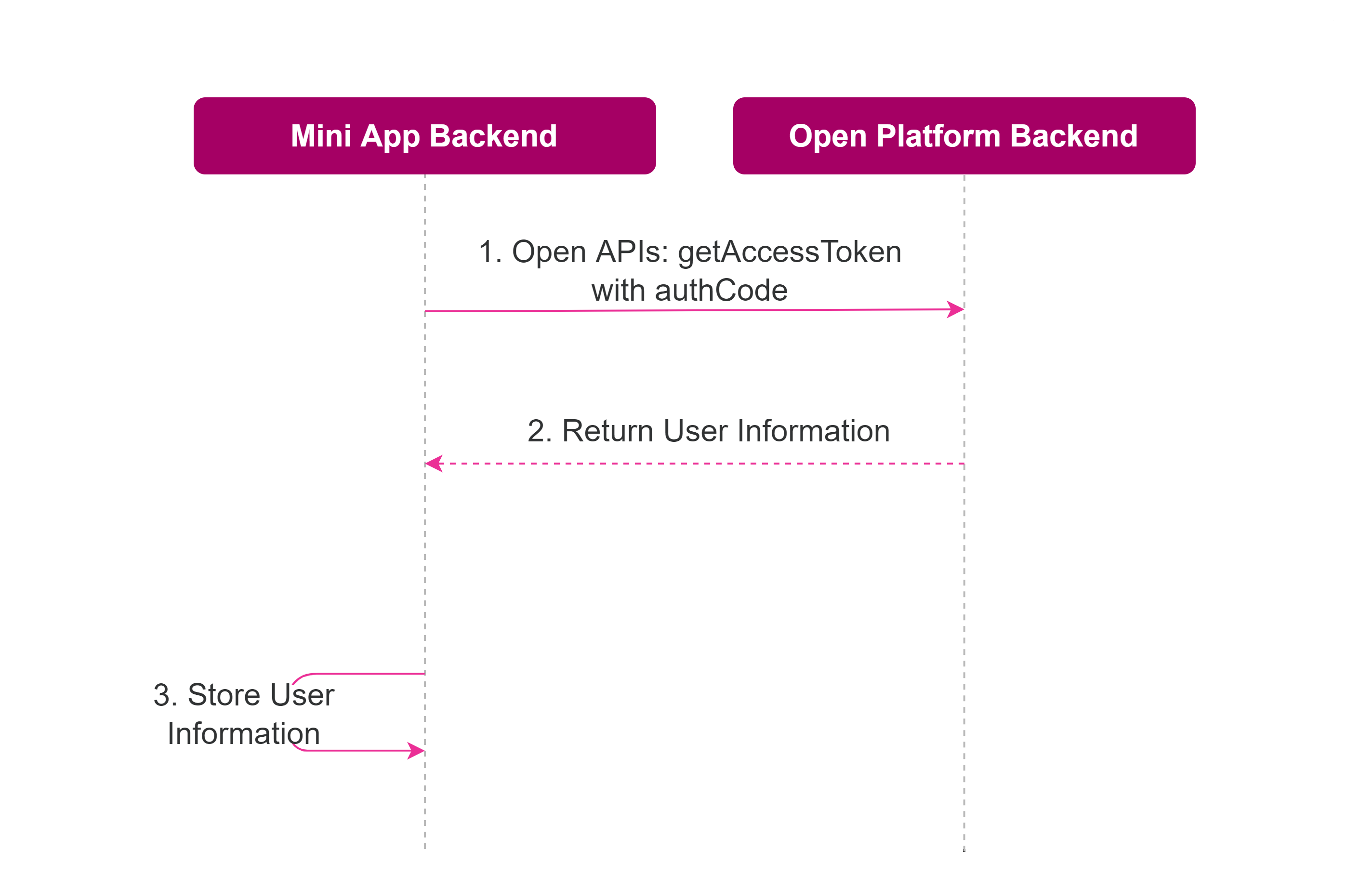
The data flow of retrieving a user's information is illustrated below:
| Step | Description |
|---|---|
| 1 | The 3rd-Party Backend calls this API with the Access Token to inquire about the user's information |
| 2 | The Open Platform Backend returns the user's information to the 3rd-Party Server based on the scopes of the User’s granted permissions |
| 3 | The 3rd-Party Backend can store the returned User Information for business purposes |
2. Function Request & Response params
REQUEST
URL Test:
https://api.mservice.com.vn/openapi/gateway/open/v1/msd/users?partnerUserId={{partnerUserId}}&fields=phone,agent,name,address
URL Prod:
https://openapi.momo.vn/gateway/open/v1/msd/users?partnerUserId={{partnerUserId}}&fields=phone,agent,name,address
Method : GET
Response Type : text/json
Headers
| Header | Data type | Required | Description |
|---|---|---|---|
| Authorization | String | Yes | Bearer accessToken |
| OP-Signature | String | Yes | Refer to Open Signature to know how to create OP-Signature |
| M-Timestamp | String | Yes | Timestamp when client makes request |
| mediaTypeId | String | No | Set the value for this Header with miniAppID - the ID of the Mini App that calls OpenAPIs. For more details, see the Encrypt and Decrypt Data guide. |
| encrypted | Boolean | No | true: if Request Data is encrypted. false: if Request Data is unencrypted. For more details, see the Encrypt and Decrypt Data guide. |
| requestKey | String | No | Encrypted Symmetric Key that used to encrypt Request Data. For more details, see the Encrypt and Decrypt Data guide. |
Query Parameters
| Param | Data type | Required | Description |
|---|---|---|---|
| partnerUserId | String | Yes | Data from GetUserAuth Mini API |
| fields | String | Yes | List of attributes needs to get in User Profile Value: address / addressKyc / city / countryCode / countryName / currentAddress / deviceName / deviceOs / dobKyc / email / fullNameKyc / gender / genderKyc / loyaltyPoints / maritalStatus / microShop / name / nationality / nationalityKyc / nickname / phone / preferedLanguage / professional |
RESPONSE
List of attributes that are granted by User and contained in Query Params "fields":
| Param | Data type | Description |
|---|---|---|
| id | String | Attribute Id |
| attribute | String | Attribute Key |
| displayName | String | Attribute Name (English) |
| displayVi | String | Attribute Name (Vietnamese) |
| accessType | String | Attribute Access Type [READ, WRITE]. Default is READ |
| value | String | Value of Attribute |
3. Sample Request & Response
Request
curl --location --request GET 'https://api.mservice.com.vn/openapi/gateway/open/v1/msd/users?fields=name,phone,address&partnerUserId={{partnerUserId}}' \
--header 'OP-Signature: {{opSignature}}' \
--header 'M-Timestamp: {{mTimestamp}}' \
--header 'Authorization: Bearer {{accessToken}}'
Response
[
  {
    "id": 1,
    "attribute": "phone",
    "displayName": "Phone Number",
    "displayVi": "Phone Number",
    "accessType": "READ",
    "value": "0961234567"
  },
  {
    "id": 3,
    "attribute": "name",
    "displayName": "Name",
    "displayVi": "Name",
    "accessType": "READ",
    "value": "NGUYỄN VĂN A"
  }
]
NOTIFICATION
Send Notification
POST /v1/msd/notifications
1. Function Introduction
With this API call, 3rd-Party can send a service notification to users via Open Platform, such as payment result, order status, and so on. The Access Token will be used during API call.
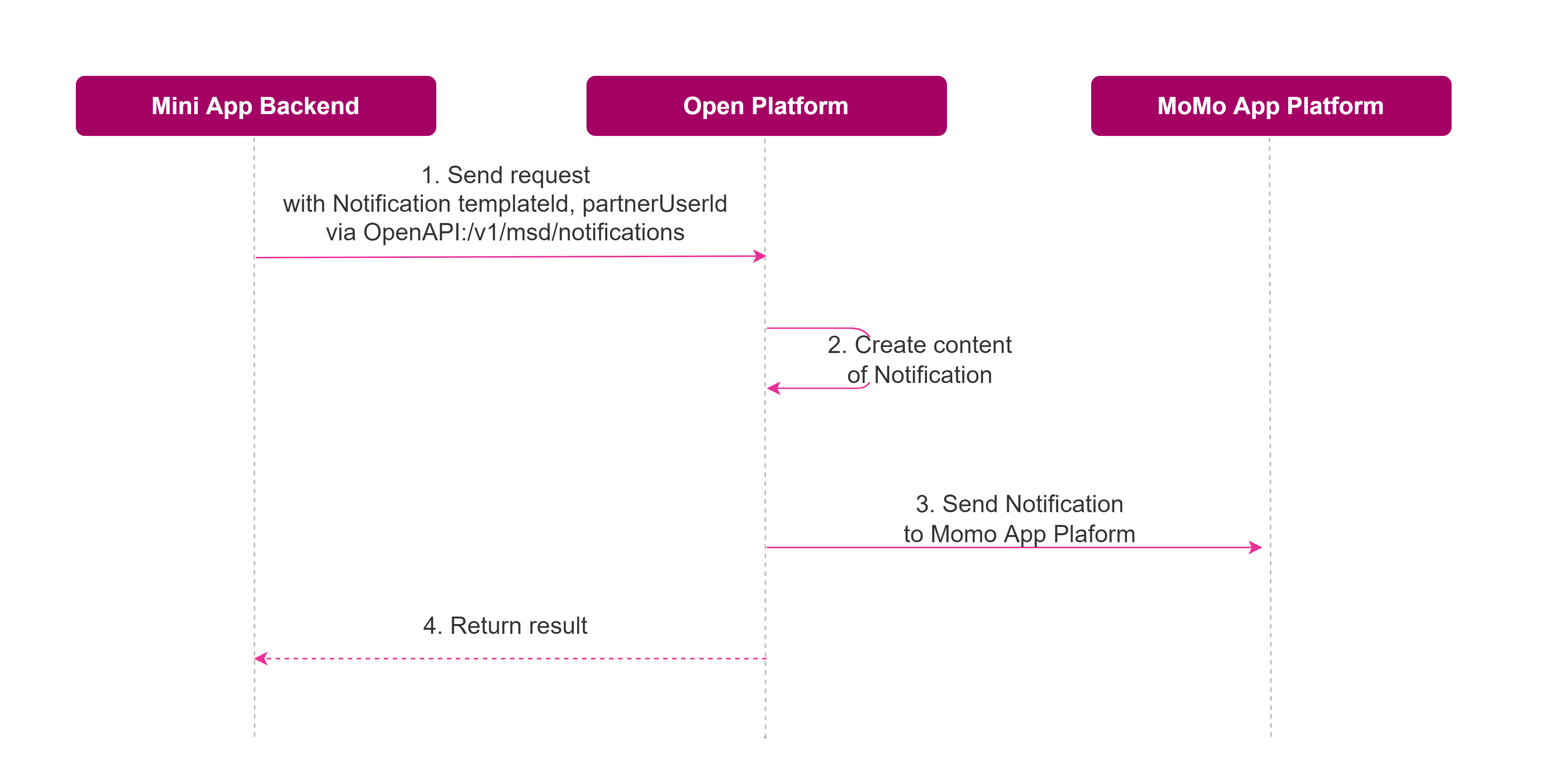
The data flow below illustrates how 3rd-Party sends notifications to a user:
| Step | Description |
|---|---|
| 1 | The 3rd-Party gets the TemplateID and Template Parameters from Mini App Center. With the TemplateID and Template Parameters, the 3rd-Party calls this API to send a request for notification delivery to MoMo App Platform. |
| 2 | Open Platform processes the request and replaces the content of variables in the notification |
| 3 | Open Platform sends the final notification to the MoMo App |
| 4 | Open Platform returns the result of the notification delivery request to the 3rd-Party Backend |
The developer needs to register Notification Feature and Notification Template on the Mini App Center before being able to push notifications. Please refer to the Notification feature guide for more details.
2. Function Request & Response params
REQUEST
URL Test:
https://api.mservice.com.vn/openapi/gateway/open/v1/msd/notifications?partnerUserId={{partnerUserId}}
URL Prod:
https://openapi.momo.vn/gateway/open/v1/msd/notifications?partnerUserId={{partnerUserId}}
Method : POST
Response Type : text/json
Headers
| Header | Data type | Required | Description |
|---|---|---|---|
| Authorization | String | Yes | Bearer accessToken |
| OP-Signature | String | Yes | Refer to Open Signature to know how to create OP-Signature |
| M-Timestamp | String | Yes | Timestamp when client makes request |
| mediaTypeId | String | No | Set the value for this Header with miniAppID - the ID of the Mini App that calls OpenAPIs. For more details, see the Encrypt and Decrypt Data guide. |
| encrypted | Boolean | No | true: if Request Data is encrypted. false: if Request Data is unencrypted For more details, see the Encrypt and Decrypt Data guide. |
| requestKey | String | No | Encrypted Symmetric Key that used to encrypt Request Data. For more details, see the Encrypt and Decrypt Data guide. |
Query Parameters
| Param | Data type | Required | Description |
|---|---|---|---|
| partnerUserId | String | Yes | Data from GetUserAuth Mini API |
Request Body
| Field | Data type | Requested | Description |
|---|---|---|---|
| id | String | Yes | Format: {{timestamp}} - timestamp: API call timestamp |
| templateId | String | Yes | Id of Notification Template |
| lang | String | Yes | Language [en/vi] |
| variables | Json Object | Yes | Map variable/value of all parameters used in Notification Template |
RESPONSE
Result of Publishing Notification:
| Param | Data type | Description |
|---|---|---|
| errorCode | String | Error Code of Response |
| errorDesc | String | Description of Response |
3. Sample Request & Response
Request
curl --location --request POST 'https://api.mservice.com.vn/openapi/gateway/open/v1/msd/notifications?partnerUserId=MZU601ukdyI0fkzBtyLghbOQufPOsJWhBfw' \
--header 'OP-Signature: j-oCeyKze4P5KqHPWZgZLSEv7KYrvozFV86Ku4TnmG6K0IKZxe1PCt4iiQIixrH075BjdrHDv9hq1T-qhMHDLzgZ2m2wkeRYeuIOZvjPgTgc-LnZASFt4HFDAV-UP8eW6WNJ_xqEs7SS4To9iJjmtxcJdpcb2mwiPjQgXhu8AWw-7jCcm-VBLxvVeGzoe7JWQDAuNcZIj198cP6oeaIKF5M1BZM9SepPnHih9hO5u7qztGTvPuhHYlhfLgv-e1g4NgXFeRlKpmrIjFXgmZJ4MUnn4CtYIRj98MN3fM2Co2Wi4Z_Uc7gf64KTYbAiIQ_01M-vgVc-bjBxUN9VRG6Y5g==' \
--header 'M-Timestamp: 1662724487' \
--header 'Authorization: Bearer eyJ0eXAiOiJKV1QiLCJhbGciOiJSUzI1NiJ9.eyJjcmVhdGVUaW1lIjoxNjU5NTE5MjEwNDQwLCJtaW5pQXBwSWQiOiJtaW5pYXBwLkFpVE1ldktyODYyalJzejAxeUJILmFwcDEiLCJwYXJ0bmVyQ29kZSI6Ik1PTU9BUFBUMjAyMjA4MDMiLCJtaW5pQXBwVXNlcklkIjoiTVphOTJGMkJHTUdFLUYyZGhsRHFwY3Jhb2FVMzVmRUFOcnciLCJwYXJ0bmVyVXNlcklkIjoiTVpVNjAxdWtkeUkwZmt6QnR5TGdoYk9RdWZQT3NKV2hCZnciLCJpYXQiOjE2NTk1MTkyMTAsImV4cCI6MTY2NzI5NTIxMH0.XZEeX4GDowo4nK02tQkpoYEf8PmYF86mrFil5yDoNjXjkG9r26Emk-osLDbQGDYJnmoAoNr3dcxghAg7WSrD7fnrVnBBXAxX27r8dBvSAUnKoNXh2_eY-02vadjvsCLzwpir1tkQm3JpE1dkScCw-ftoSHmRunixdIzYQof9w5z_g5GHXhz58Pp-pxFV1IVc25KGGRI7qvyOigwXbirQ-3L9VEmQpNGWUE8n0fFir8QOgDuy1ru8ZUMw1RiHFe_t6CYQZNj6BjeuNT6Z0C3aPFxMeUMvauCixDrKR8OxZxLo5_2pHyvrCFmjJ5gkgkOK9ax15VvU9hPDZ5su-qGONg' \
--header 'Content-Type: application/json' \
--data-raw '{
	"id": "1662724487",
	"templateId": "MINIAPP_1FA57F",
	"lang": "en",
	"variables": {
    	"status": "success",
    	"service_name": "Momo Test 1234567",
    	"message": "Momo Ho Chi Minh",
    	"booking_id": "1900000000000"
	}
}'
Response
{
    "errorCode": 0,
    "errorDesc": "SUCCESS",
    “responseMsg”: "5109610775746892"
}
4. Error Code
| Error Code | Description |
|---|---|
| 0 | SUCCESS |
| 1006 | SYSTEM_ERROR |
| -25 | NOT_SUPPORT |
| -2 | INVALID_MESSAGE |
| -313 | RATE_LIMITED |