API Specifications
OVERVIEW
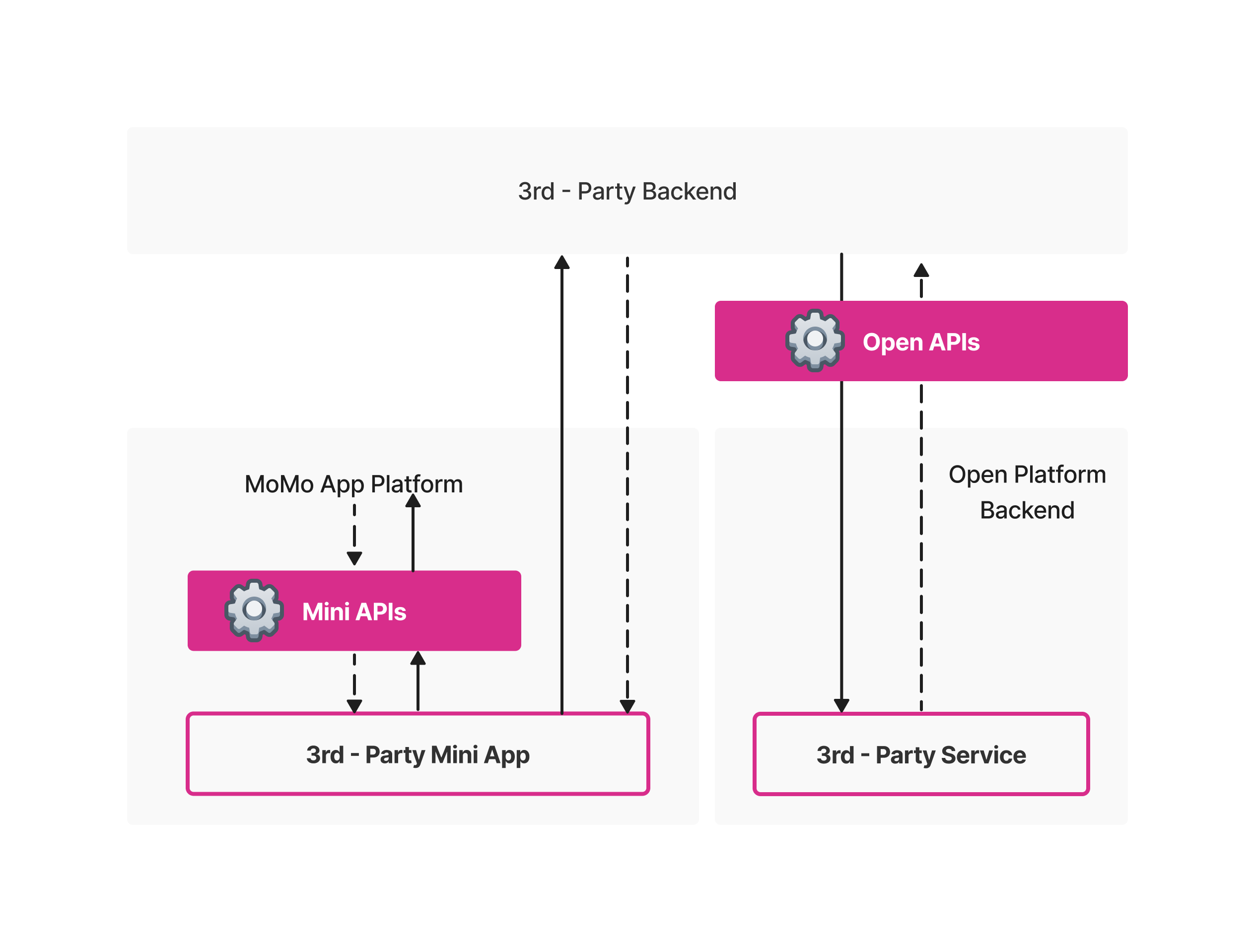
M_Service Open APIs (or Open APIs for short) are sets of APIs provided by M_Service Open Platform (or Open Platform) for Third-Party (hereby 3rd-Party) Server to interact with MoMo Server (server to server interaction). Combined with Mini APIs, they can help merchants (3rd-Parties) implement specific functions, for example:
- Authorize 3rd-Party Server
- Get User Profile
- Push Notification to MoMo App from 3rd-Party Server
- …
Architecture Overview
The API calling process of Open API and Mini API is illustrated below:
Versioning
The current API version is v1.
The version is specified in the URL. For example:
https://{host}/gateway/open/v1/msd/users
DATA DICTIONARY
Authorization Type
All APIs in Open API need to be authorized via a specific JWT Token whenever being used. The authorization mechanism is based on the industry standard OAuth2.0 authorization mechanism.
| Name | Key | Description |
|---|---|---|
| Authorization Code | authCode |
|
| Access Token | accessToken |
|
Security in Open APIs
Open API provides Open Signature and Data Encryption/Decryption methods to ensure Integrity Data Guarantees and Data Concealment Guarantees.
| Name | Key | Description |
|---|---|---|
| Open Secret Key | openSecretKey | |
| Open Private Key | openPrivateKey | |
| Open Public Key | openPublicKey | |
| M_Serivce Digital Signature (or Open Signature) | OP-Signature |
USAGE
1. Get Authorization Code
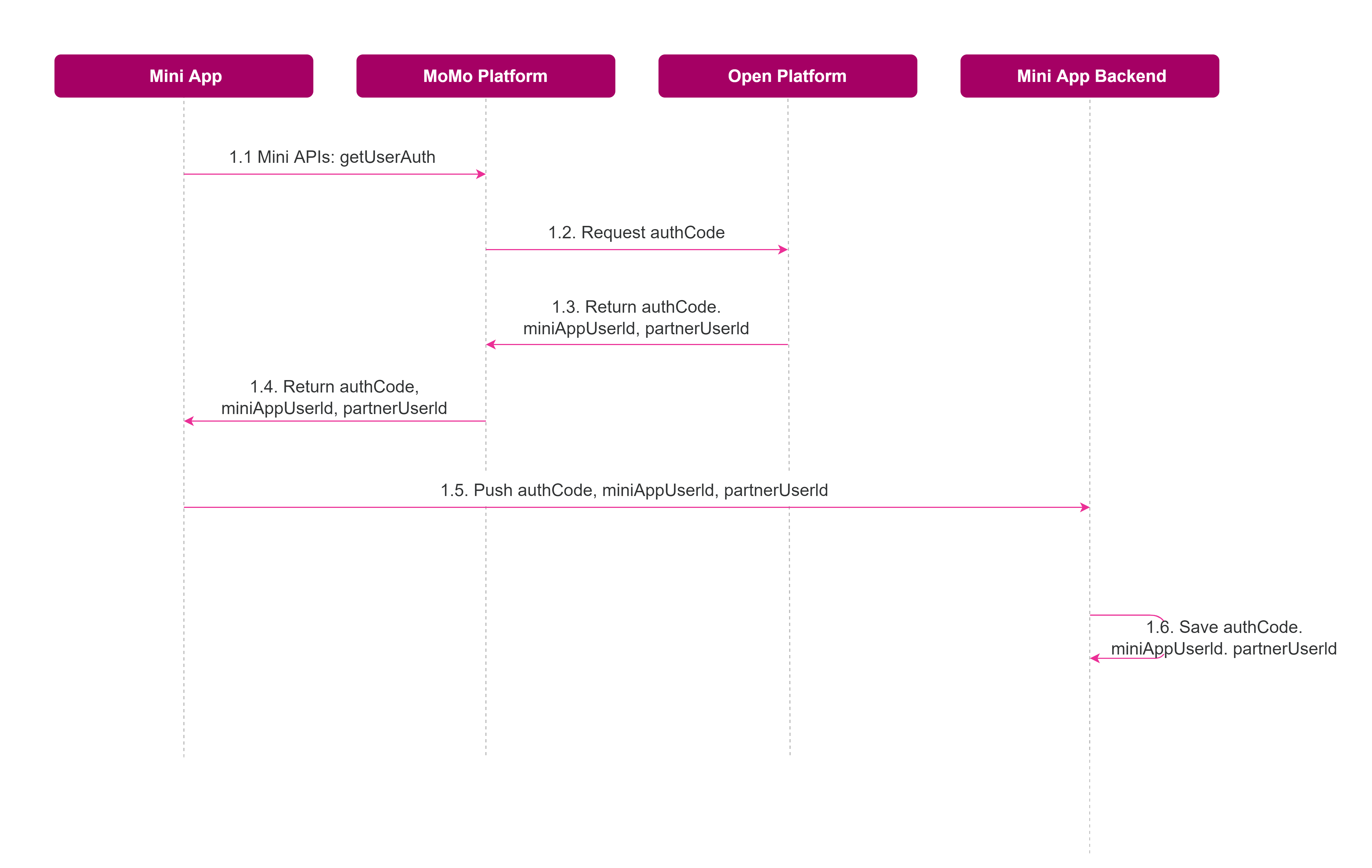
Before you can call any API in Open APIs, you must get Authorization Code (authCode) first and exchange it with the Access Token (accessToken). The overall process of obtaining the Authorization Code is illustrated below:
| Step | Description |
|---|---|
| 1.1 | The Mini App calls the getUserAuth Mini API to get the Authorization Code (authCode) from the MoMo App Platform |
| 1.5 | After receiving the authCode, the Mini App sends this data to the 3rd-Party Backend |
| 1.6 | Save authCode, miniAppUserId, partnerUserId in the 3rd-Party Backend |
The following steps will help you to obtain the Authorization Code:
- Step 1: Installation
First, you must install and import Mini API to your Mini App. Follow the instructions in this link to know how to install and import Mini API.
- Step 2: Call getUserAuth Mini API
To call getUserAuth Mini API, read more about this API’s information in this link.
2. Obtain Open Secret Key, Open Private Key, Open Public Key
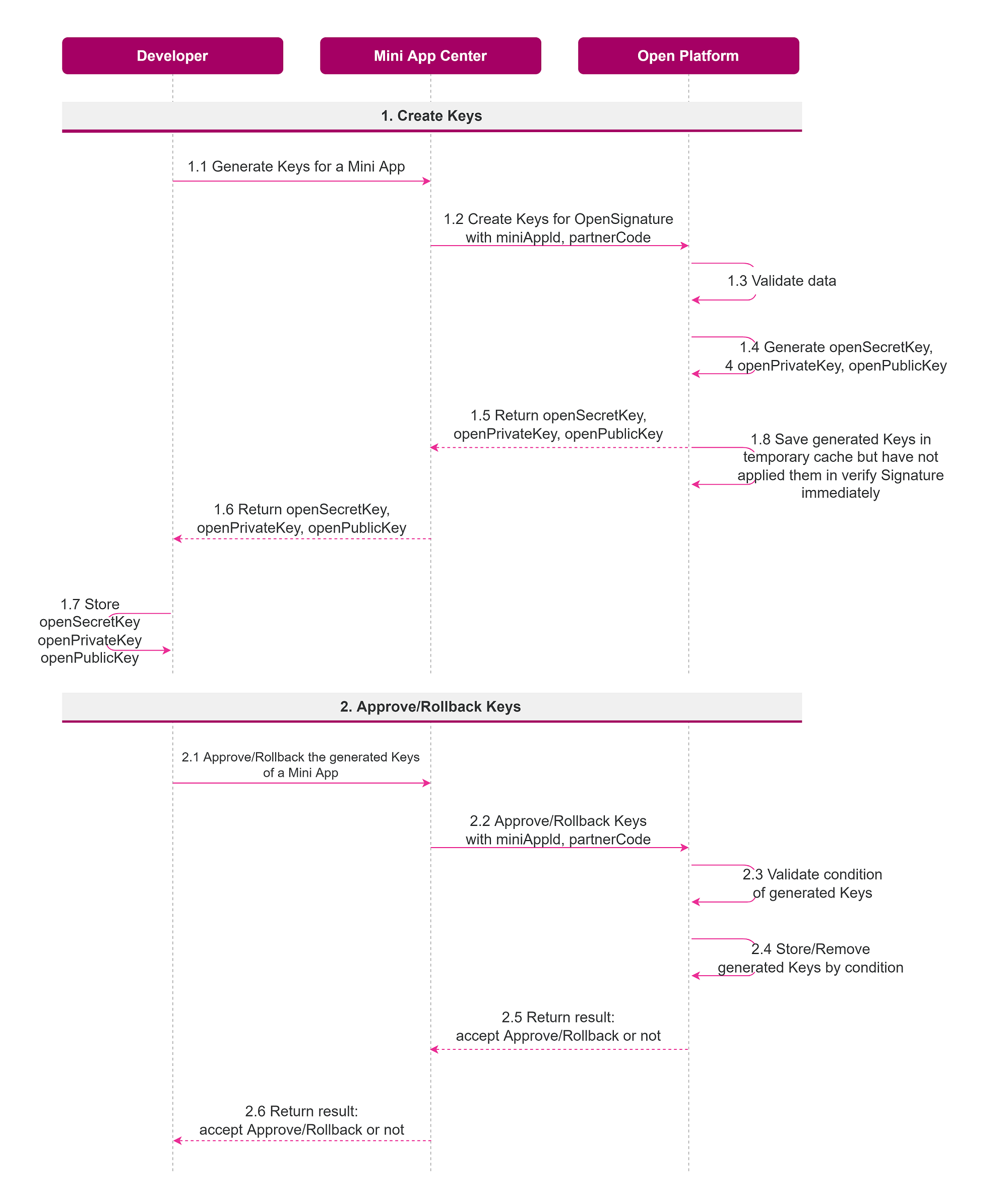
The overall process to obtain these keys is illustrated below:
Steps to Create Keys:
| Step | Description |
|---|---|
| 1.1 | 3rd-Party developers need to login to Mini App Center and register to generate some specific Keys (openSecretKey, openPrivateKey, openPublicKey) that will be used to create and verify Open Signature |
| 1.7 | 3rd-Party needs to store openSecretKey, openPrivateKey, openPublicKey to create and verify Open Signature in every Server-2-Server request with Open Platform |
| 1.8 | If the 3rd-Party developers attempt to change the keys, the newly generated keys will not yet be applied to verify Open Signature in Open Platform immediately after generation. The new keys will automatically be applied after 07 days (168 hours) |
Steps to Approve/Rollback Keys:
| Step | Description |
|---|---|
| 2.1 |
For more details on how to get the Open Secret Key, the Open Private Key, and the Open Public Key on Mini App Center, refer to this document.
3. Create Open Signature (OP-Signature)
For Integrity Data Guarantees, MoMo requires that the data of Request in Open APIs needs to be signed, and data in Response Body returned from Open Platform will also be signed.
The Open Signature has the following format:
OP-Signature = Base64UrlEncode(SHA256withRSA(data + M-Timestamp + openSecretKey))
- The construct of OP-Signature is a combination of data of Request, timestamp, and openSecretKey.
-
**Data of Request: ** With the GET Method API, data is the query parameters part in the Request URL. For example:
Request URL: https://api.momo.vn/gateway/open/v1/msd/users?partnerUserId=app.test.miniapp&fields=name,phone,address The data will be: “partnerUserId=app.test.miniapp&fields=name,phone,address”
-
With POST Method API, data is the Request Body in string format.
-
M-Timestamp: timestamp when Request was created.
-
- This combination will be hashed and encrypted by algorithm SHA256withRSA with openPrivateKey provided by Open Platform.
- After being encrypted, it will be encoded with Base64UrlEncode.
After creating OP-Signature, 3rd-Party Backend needs to send OP-Signature and M-Timestamp along with the API request through the following Request Headers:
| Header | Content |
|---|---|
| OP-Signature | Generated Signature. For example: kyC0AXHeo0wsy7cFioEYtbOUnPF9QmEWApbJDMm...pjNamnZDznDkHGy-lomQyQw== |
| M-Timestamp | Specifies the time when a request is sent. Note: This field must be accurate to milliseconds. For example: 1652707899536 |
For more detail about how to sign a request and verify a response, refer to this document.
4. Encrypt and Decrypt Data
For Data Concealment Guarantees, MoMo requires that data of Request in Open APIs needs to be encrypted, and the data in Response Body returned from Open Platform will also be encrypted.
Encrypted data can help us hide the request data. But this will make your API Request slow.
The overall encrypt/decrypt data process for Open Platform is illustrated as below:
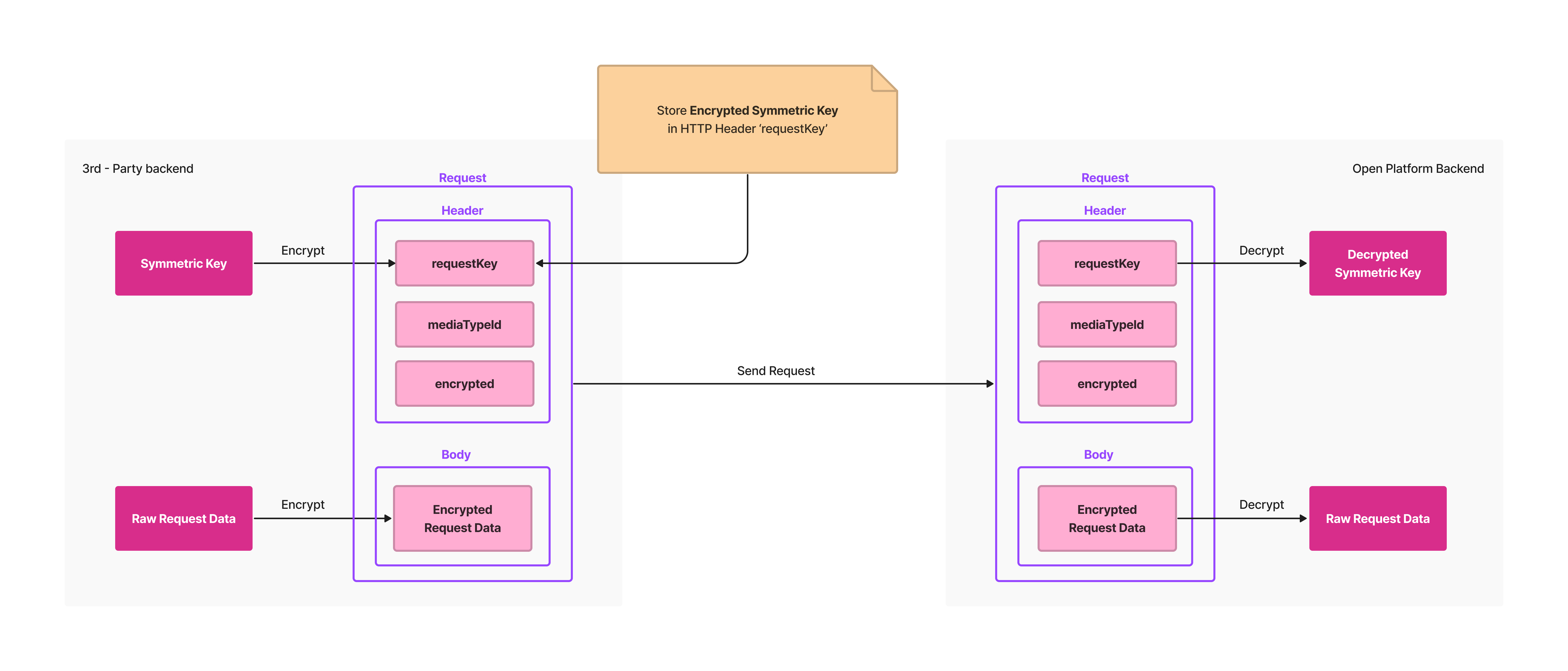
- To encrypt data, firstly, you need to create a Symmetric Key generated by the AES algorithm.
- Use generated Symmetric Key to encrypt Request Data:

-
In POST method API, Request Data is the Request Body.
-
In GET method API, Request Data is the Query Parameters part in the Request URL. Example:
Request URL: https://api.momo.vn/gateway/open/v1/msd/users?partnerUserId=app.test.miniapp&fields=name,phone,address
Request Data will be: “partnerUserId=app.test.miniapp&fields=name,phone,address”
-
Use Open Public Key to encrypt generated Symmetric Key, and send this encrypted Symmetric Key in Request via HTTP Header ‘requestKey’

- Send encrypted Request Data in Request:
-
In POST method API, send encrypted Request Data in the Request Body.
-
In GET method API, send encrypted Request Data via the Query Parameter ‘data’. Example:
With “/oWDekITP+UK8ddccT3Oj2VxFw8axAETB6qCoODGBITrHuZOxPEAm4amklpAdBpwG/1L2TV4qsbhycuq4e0g72QF4q0sRaNykQ0jEdA4ivISvmCotytbPFwV6LpJwkazkV5QRtOL3Gk+Jq+uLwX3wQ==” is the encryption of “partnerUserId=app.test.miniapp&fields=name,phone,address”
-
For more detail about how data encryption/decryption works, refer to this document.
5. Get Access Token
Almost all APIs in OpenAPI use Access Token as Authorization Credentials, so you need to obtain Access Token before calling any API. The overall process of obtaining an Access Token is illustrated below:
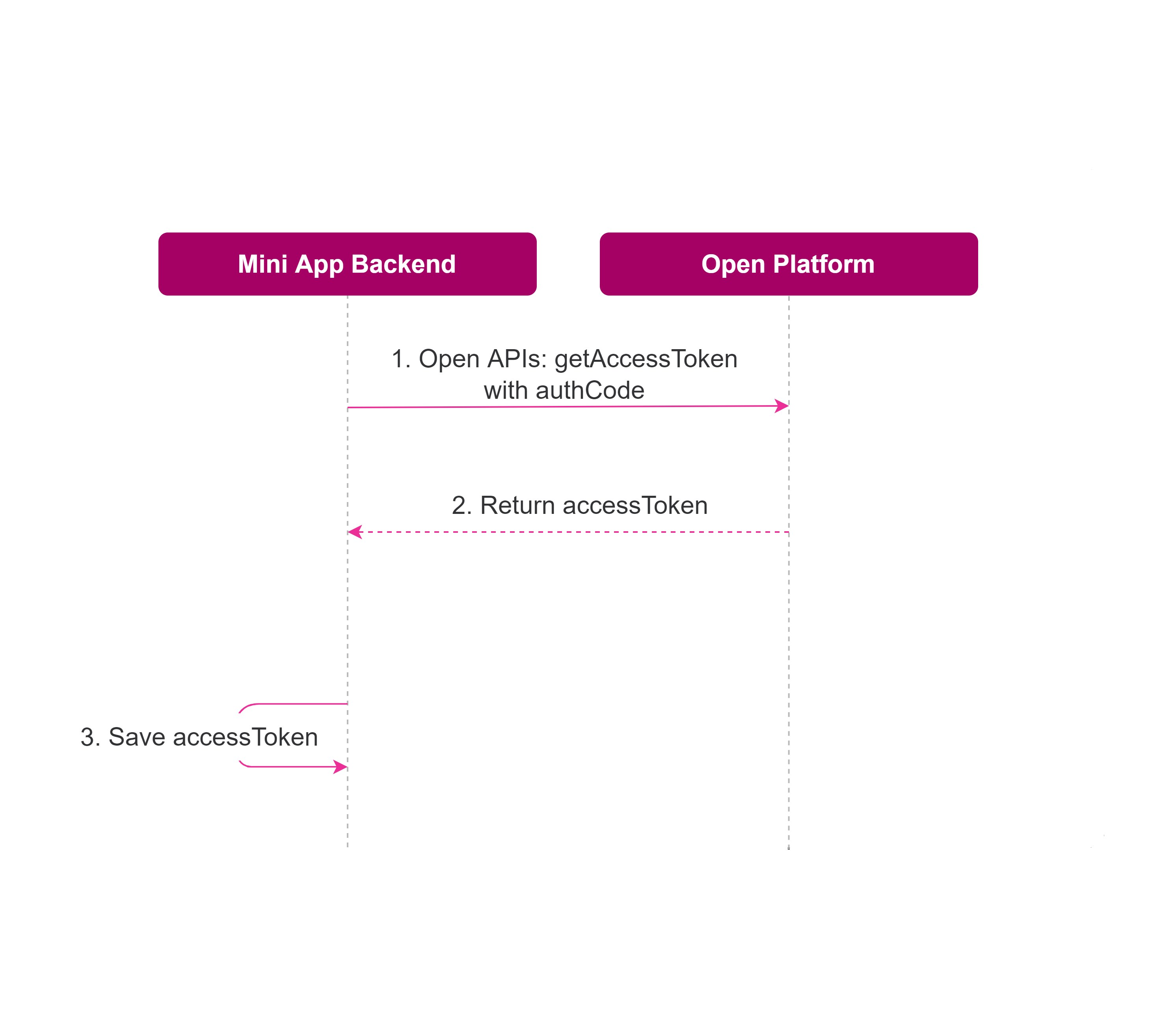
| Step | Description |
|---|---|
| 1 | The 3rd-Party Backend calls the getAccessToken Open API and the Open Platform Server will return the accessToken |
| 3 | The 3rd-Party Backend saves the accessToken and uses it as an authorization credential in other APIs in Open APIs |
For more detail about how to obtain Access Token, refer to this document.
MESSAGE STRUCTURE
Before you make any request, it is important to understand how Open APIs work and how requests and responses are structured. This section presents general information (such as message structure, message fields, and message transmission) of online messages between your system and the Open Platform Backend.
Request structure
The following figure illustrates the request structure.
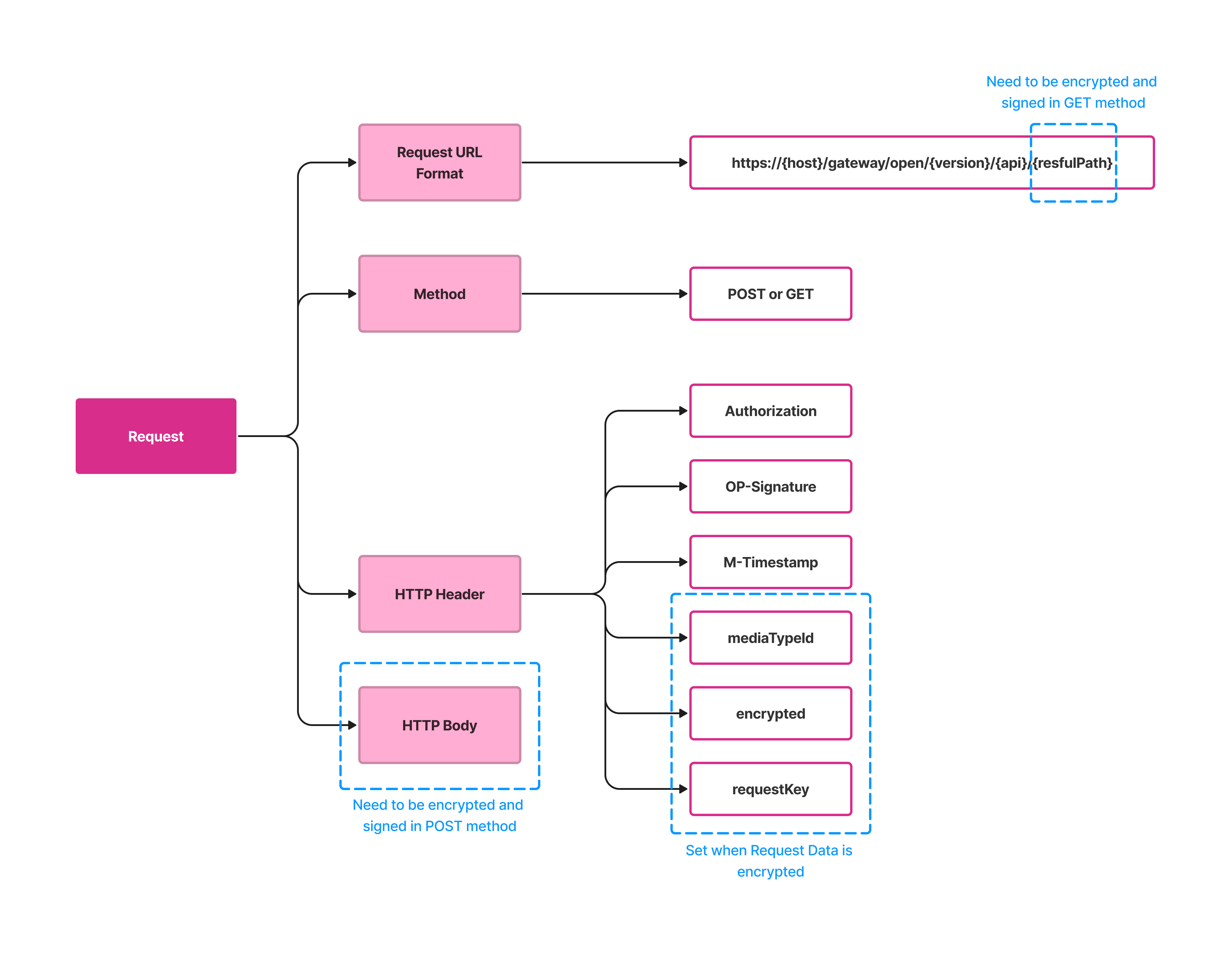
- Request URL Format:
The request URL is:
https://{host}/gateway/open/{version}/{api}/{restfulPath}
which has the following structure:
-
host: includes the host that is the standard domain name assigned by the Open Platform Backend.
-
version: is the version of Open APIs, for example, v1 or v2.
-
api: is the name of the API assigned by the Open Platform Backend, for example: msd/users.
-
restfulPath: includes query params needed to execute the API. In the GET method, restfulPath needs to be encrypted and signed.
-
Request method: the POST method and the GET method are used to make an HTTP request.
-
Request header: The request header mainly contains the following fields.
Headers are case-sensitive.
| Header | Required | Description |
|---|---|---|
| Authorization | Yes | Credential Token for Authorization |
| OP-Signature | Yes | Contain the signature value of the request. For details about how to generate a signature, see the Open Signature guide. |
| M-Timestamp | Yes | Specify the time when the request is sent. Note: This field must be accurate to milliseconds. For more details, see the Open Signature guide. |
| mediaTypeId | No | Set the value for this Header with miniAppID - the ID of the Mini App that calls OpenAPIs. For more details, see the Encrypt and Decrypt Data guide. |
| encrypted | No | true: if Request Data is encrypted. false: if Request Data is unencrypted. For more details, see the Encrypt and Decrypt Data guide. |
| requestKey | No | Encrypted Symmetric Key that used to encrypt Request Data. For more details, see the Encrypt and Decrypt Data guide. |
-
Request Body:
The Request Body contains the detailed request information in JSON format. Fields enclosed in the Request Body vary depending on services. For more information, see the specific API details in the Catalog Functions document.
In the POST method, the Request Body must be encrypted first and then signed. The signature of the encrypted Request Body will be set to OP-Signature Header.
Response structure
The following figures illustrate the response structure:
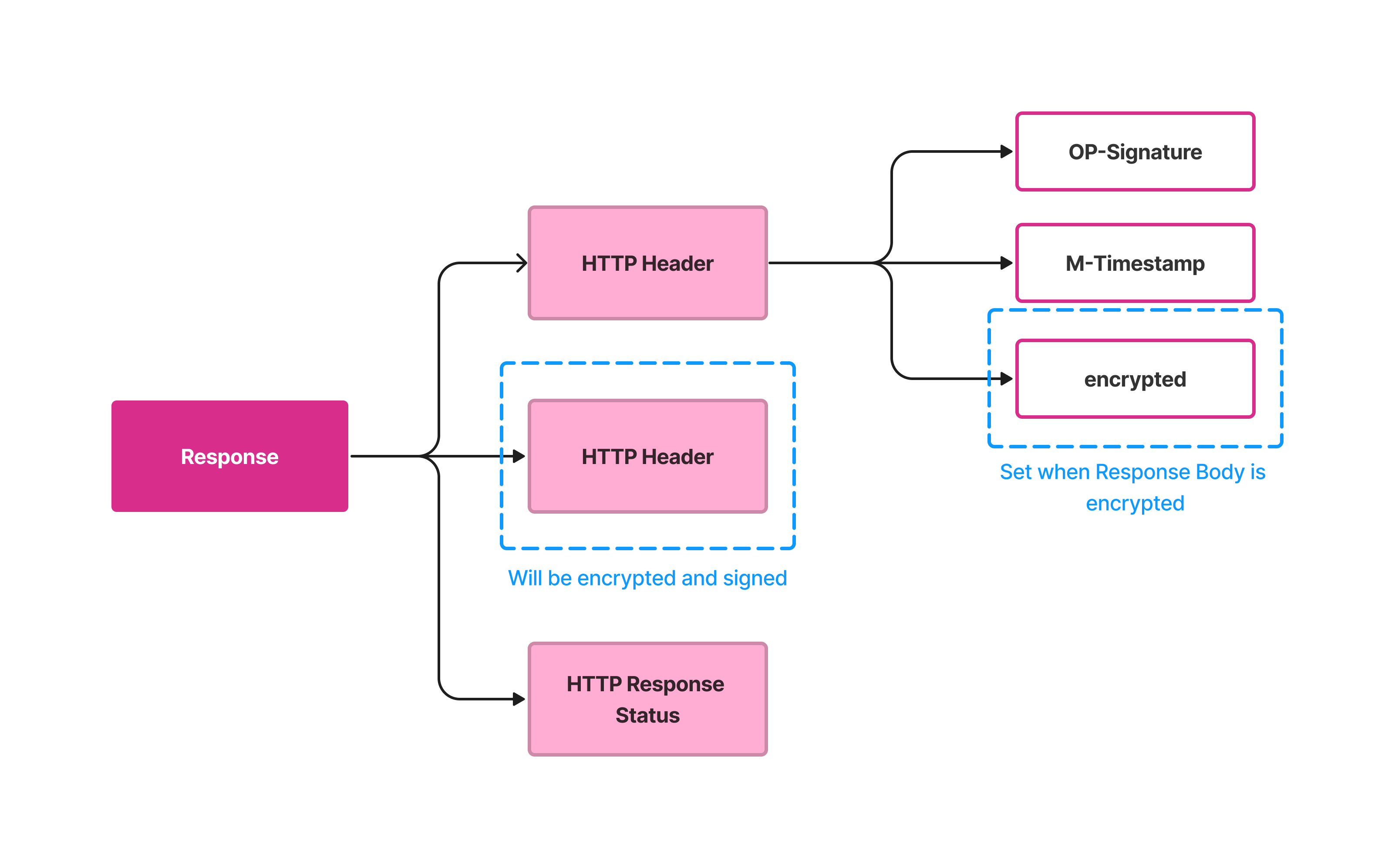
- Response Header:
The response header carries the information about the response, mainly containing the following fields.
Headers are case-sensitive.
| Header | Required | Description |
|---|---|---|
| OP-Signature | Yes | Contains the signature value of the response. For more details, see the Open Signature guide. |
| M-Timestamp | Yes | Specifies the time when the response is returned |
| encrypted | Yes | true: if Response Body is encrypted. false: if Response Body is unencrypted. For more details, see the Encrypt and Decrypt Data guide. |
- Response Body:
The Response Body contains the information responding to the client. Fields in this section vary depending on services.
The Response Body will be encrypted first and then signed. The signature of the encrypted Response Body will be set to OP-Signature Header.
FUNCTIONS
Authorization
| Name | Path | Description |
|---|---|---|
| Get Access Token | GET /v1/oauth/accessToken | Get Access Token for Authorization Credential |
User
| Name | Path | Description |
|---|---|---|
| Get User Consents | GET /v1/msd/users | Get User Profiles granted by User |
Notification
| Name | Path | Description |
|---|---|---|
| Send Notification | POST /v1/msd/notifications | Send a notification to MoMo App |