Payment On All-In-One Devices
All-in-one payment is a comprehensive, integrated solution that allows customers the flexibility to choose between using physical card(touch, plug in, or swipe) and scan multi-purpose QR code. Use AIO QR code via MoMo app or your bank to complete transactions in an instant.
Processing Flow
Flow Diagram
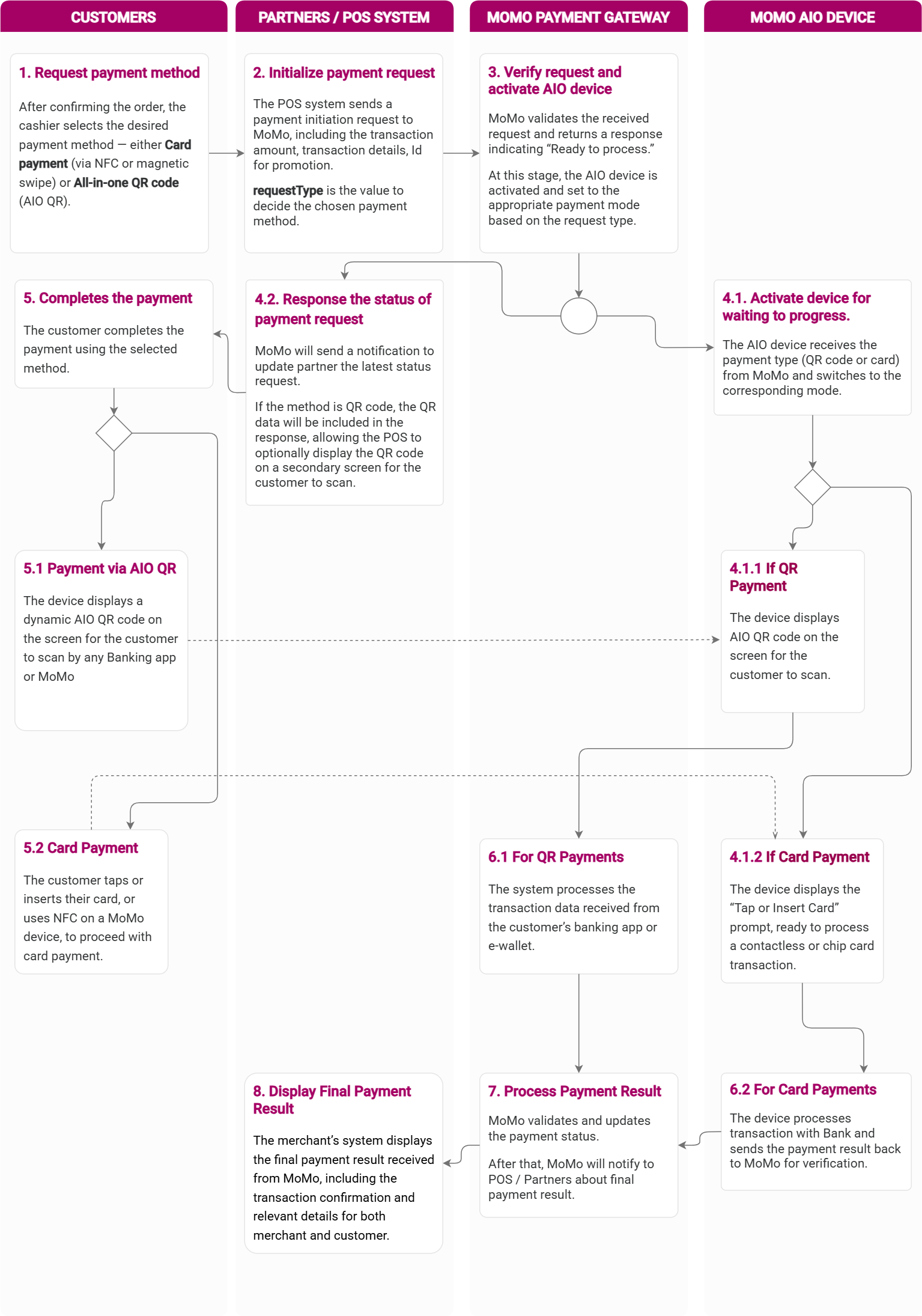
Explanation
- Step 1: Payment confirmation: Customers select products and choose a payment method: card (physical/NFC) or multi-purpose QR code.
- Step 2: Request initiation: The Partner's sales system creates a payment request (including the amount and EDC machine ID) and sends it via the MoMo system.
- Step 3: Verification and Activation: The MoMo payment gateway verifies the request, returns the "Pending Payment" status to the partner's POS machine, and simultaneously activates the EDC machine.
- Step 4.1 & 4.2: Device activation: The MoMo AIO device receives an activation command to prepare for payment processing, while the MoMo gateway returns the status result to the sales system.
- Display stream on EDC: 4.1.1 (If it's a multi-purpose QR code): The EDC device displays the multi-purpose QR code on the screen. 4.1.2 (If paying by card): The EDC machine displays a screen waiting for card reading (Insert/Swipe/Tap).
- Step 5: Customer payment: The customer performs the action corresponding to the chosen payment method: 5.1: Use your banking app or e-wallet to scan the QR code. 5.2: Use a physical card or NFC wallet on your phone to tap/insert into the EDC device.
- Step 6: Receiving and processing information: 6.1: System for receiving results from QR payment applications. 6.2: The AIO device processes card information, verifies it, and reports the results to MoMo.
- Step 7: Final processing: MoMo processes the signal from the device and updates the final payment data for its partners.
- Step 8: Displaying the result: The partner's system receives a success notification, prints a receipt (if applicable), and completes the transaction with the customer.
API Configuration
Payment setup method
- The Partner's sales system generates payment requests using the corresponding payment method and sends them via the MoMo system.
HTTP Request
POST /v2/gateway/api/create
| Parameter | Type | Required | Description |
|---|---|---|---|
| userInfo | Object | Info of the customer | |
| subPartnerCode | String(50) | Sub partner Id. Apply to Master Merchant, 3PSP: third party services provider groups only | |
| storeName | String | Partner store name. | |
| storeId | String(50) |  | Store ID. This is required. MoMo will check if storeId is mapped with edc device or not. If MoMo figured out that this storeId was not mapped with any devices, MoMo will reject this request |
| signature | String | | Signature to confirm information. Secure transaction in Hmac_SHA256 algorithm with format, a String sort all key name of data field from a-z: accessKey=$accessKey&amount=$amount&extraData=$extraData &ipnUrl=$ipnUrl&orderId=$orderId&orderInfo=$orderInfo &partnerCode=$partnerCode&redirectUrl=$redirectUrl &requestId=$requestId&requestType=$requestType |
| serialNumber | String | This number will be provided by MoMo and printed on device. This number will be mapped with each store. If merchant request payment method with storeId and serialNumber, MoMo will validate if storeId is mapping correctly with serialNumber. If merchant request payment with storeId without serialNumber, MoMo will find the latest serialNumber which mapped with storeId | |
| requestType | String | | payWithEdc |
| requestId | String(50) | | Request ID, unique for each request, MoMo's partner uses the requestId field for idempotency control |
| referenceId | String(200) | Partner sub-reference code. For example, used in cases like customer code, household code, invoice code, subscriber code, etc. | |
| redirectUrl | String | | Default value is empty "" . A partner's URL. This URL is used to redirect from MoMo page to partner's page after customer's payment. Support: AppLink and WebLink |
| partnerCode | String(50) | | Integration information |
| orderInfo | String(255) | | Order's information |
| orderId | String(200) | | Partner Transaction ID Regex: ^[0-9a-zA-Z]([-_.]*[0-9a-zA-Z]+)*$ |
| orderGroupId | Long | The orderGroupId will be provided by MoMo to classify groups of orders for further operational activities. Please contact MoMo to use this field | |
| lang | String | | Language of returned message (vi or en) |
| items | List | List of products displayed on the payment page. Maximum: 50 items | |
| ipnUrl | String | | Partner API. Used by MoMo to submit payment results by IPN method (server-to-server) method |
| instrumentType | String | Possible value: QR: when merchant need to generate QR on edc device. AIO QR will be default. CARD: when merchant need to enable pay with card on edc device. If the value is empty "", it will be CARD in default. | |
| extraData | String(1000) | | Default value is empty "" Encode base64 follow Jsonformat: {"key":"value"} Example with data: {"username":"momo","skus":"value1,value2"} => data of extraData: eyJ1c2VybmFtZSI6Im1vbW8iLCJza3VzIjoidmFsdWUxLHZhbHVlMiJ9 |
| deliveryInfo | Object | Delivery info of this order | |
| autoCapture | Boolean | If set to false, the payment will not be automatically captured. | |
| amount | Long | | Amount needs to be paid. Min: 1,000 VND Max: 50,000,000 VND Currency: VND Data type: Long |
Example request
{
  "partnerCode": "MOMOHIUI20181015",
  "partnerName": "Test",
  "storeId": "kozen029",
  "subPartnerCode": "MOMOLFZB20230228",
  "storeName": "Hand sanitizer",
  "requestType": "payWithEdc",
  "ipnUrl": "https://sangle.free.beeceptor.com",
  "redirectUrl": "https://sangle.free.beeceptor.com",
  "orderId": "OD1773203367580",
  "amount": "1000",
  "just": "we",
  "autoCapture": true,
  "subscriptionInfo": null,
  "deliveryInfo": {
    "deliveryAddress": "Ho Chi Minh",
    "inStorePickup": false
  },
  "orderInfo": "Payment for the order",
  "requestId": "1773203367580id",
  "extraData": "ew0KImVtYWlsIjogImh1b25neGRAZ21haWwuY29tIg0KfQ==",
  "signature": "20c959b2d00884c3f67ead4fd7bb97a9a48cc3de07434f6a0fca164b7aff84ed",
  "instrumentType": "CARD"
}
HTTP Response
| Attribute | Type | Required | Description |
|---|---|---|---|
| partnerCode | String | | Integration information |
| requestId | String | | Each Request’s Identification |
| responseTime | Long | | Time to respond payment results to partner Format: timestamp |
| resultCode | Integer | | Order status |
| message | String | | Request result, language is based on lang |
| orderId | Object | | Partner Transaction ID Regex: ^[0-9a-zA-Z]([-_.]*[0-9a-zA-Z]+)*$ |
| amount | String | | Same as the original request! |
Example response
{
  "partnerCode":"MOMOHIUI20181015",
  "orderId":"OD1773203367580",
  "requestId": "1773203367580id",
  "amount": 1000,
  "responseTime": 1773203367760,
  "message": "Success.",
  "resultCode": 0
}
Payment
Customers can use physical or non-physical cards to pay, or use the MoMo app or their bank's QR code to make payments.
Processing payment results
Learn more about Payment Notifications Payment Notification.
Parameter description
| Attribute | Type | Required | Description |
|---|---|---|---|
| partnerCode | String | | Integration Information |
| orderId | String | | Partner Transaction ID |
| requestId | String | | Partner's requestId |
| amount | Long | | Payment amount |
| partnerUserId | String | MoMo's unique identifier for each MoMo eWallet account. | |
| storeId | String | Store ID | |
| orderInfo | String | | Order's information |
| orderType | String | | momo_wallet |
| transId | Long | | MoMo's transaction ID |
| resultCode | Integer | | Transaction status of the order Result Code |
| message | String | | Error description, languague is based on lang |
| payType | String | | Payment type: edcDevice, aio_qr, banktransfer_qr |
| responseTime | Long | | Time to respond payment results to partner Format: timestamp |
| extraData | String | | Extra Data. Default: "" |
| signature | String | | Signature to confirm information. Secure transaction in Hmac_SHA256 algorithm with format: a String sort all key name of data field from a-z: accessKey=$accessKey&amount=$amount&extraData=$extraData&message=$message&orderId=$orderId&orderInfo=$orderInfo&orderType=$orderType&partnerCode=$partnerCode&payType=$payType&requestId=$requestId&responseTime=$responseTime&resultCode=$resultCode&transId=$transId |
| cardPaymentInfo | Object | | Card payment info needed to reconcile. |
| paymentOption | String | Account/Card has been used to pay for the transaction. | |
| userFee | Long | User Fee. | |
| promotionInfo | List | | The data to identify the promotion campaign in which the voucher(s) was applied in the payment transaction, with fixed keys for each voucher Default value is null. |
Details of CardPaymentInfo
| Attribute | Type | Required | Description |
|---|---|---|---|
| cardType | String | | Type of the card Example: Visa, Mastercard, JCB, Amex. This infor come from Sale success message of edc's server |
| cardNumber | String | | Masked card data. Example: 454078**3062. This infor come from Sale success message of edc's server |
IPN Sample Request
{
  "partnerCode": "MOMOHIUI20181015",
  "orderId": "17501345596640123456778",
  "requestId": "1750134559664",
  "amount": 100000,
  "orderInfo": "Payment via MoMo wallet, hehe",
  "orderType": "momo_wallet",
  "transId": 4401354269,
  "resultCode": 0,
  "message": "Success.",
  "payType": "edcDevice",
  "responseTime": 1750134605770,
  "extraData": "eyJza3VzIjoiODkzNDgwNDAyNTc4MCw5ODkyODQ1MDAwMjMzLDg5MzQ4MDQwMjM2NDksODkzNDgwNDAyNTQ2OSxORVNUTEVNTTQ2LE5FU1RMRU1NMSw4OTM0ODA0MDIwNDAyLE5FU1RMRU1NNzUsOTg5Mjg0NTAwMDIzMiIsInVzZXJuYW1lIjoibW9tbyJ9",
  "signature": "da66a9008cc774d2ea45fe3175c1197a77bf6e18ceb14c74df454191372b27cd",
  "cardPaymentInfo": {
    "cardType": "BREATH",
    "cardNumber": "970418******9550"
  }
}
Settlement
- The Partner's sales system generates settlement requests for card payment transactions. Partners can settle transactions on an all-in-one device or generate settlement requests via the API.
API information for pushing settlement orders to AI All-in-one devices.
HTTP Request
POST /v2/gateway/card/settle
| Attribute | Type | Required | Description |
|---|---|---|---|
| partnerCode | String | | Integration information |
| storeId | String | | Store ID |
| serialNumber | String | | This number will be provided by MoMo and printed on device. This number will be mapped with each store |
| partnerCode | String | | Partner's requestId |
| signature | String | | Signature: accessKey=$accessKey&partnerCode=$partnerCode&requestId=$requestId&serialNumber=$serialNumber&storeId=$storeId |
Example request
{
  "partnerCode": "MOMOD0MX20250828",
  "storeId": "Triq3pJjqg5F2afm",
  "serialNumber": "1495221012",
  "requestId": "1759202655463id",
  "signature": "1ac4edd31ab3ffe426711e8daa541d2f47252b4943b95c72922eb27b03bf9897"
}
HTTP Response
| Attribute | Type | Required | Description |
|---|---|---|---|
| responseTime | Long | | Time to respond payment results to partner Format: timestamp |
| resultCode | Integer | | Transaction status of the order Result Code |
| message | String | | Error description, languague is based on lang |
Example response
{
  "resultCode": 0,
  "message": "Successful.",
  "responseTime": 1759202657279
}